
Slide deck
Multi-slide presentations with speaker notes, presentation mode, and HTML, PDF, or PPTX export.
Local design workspace
BurnGuard connects to your Claude Code or Codex CLI to generate websites, slide decks, graphics, logos, and templates while keeping every project file on your computer.
Free, Apache-2.0 · macOS 14+ on Apple silicon · Windows 10/11 x64 · github.com/ashmoonori-afk/BurnGuard
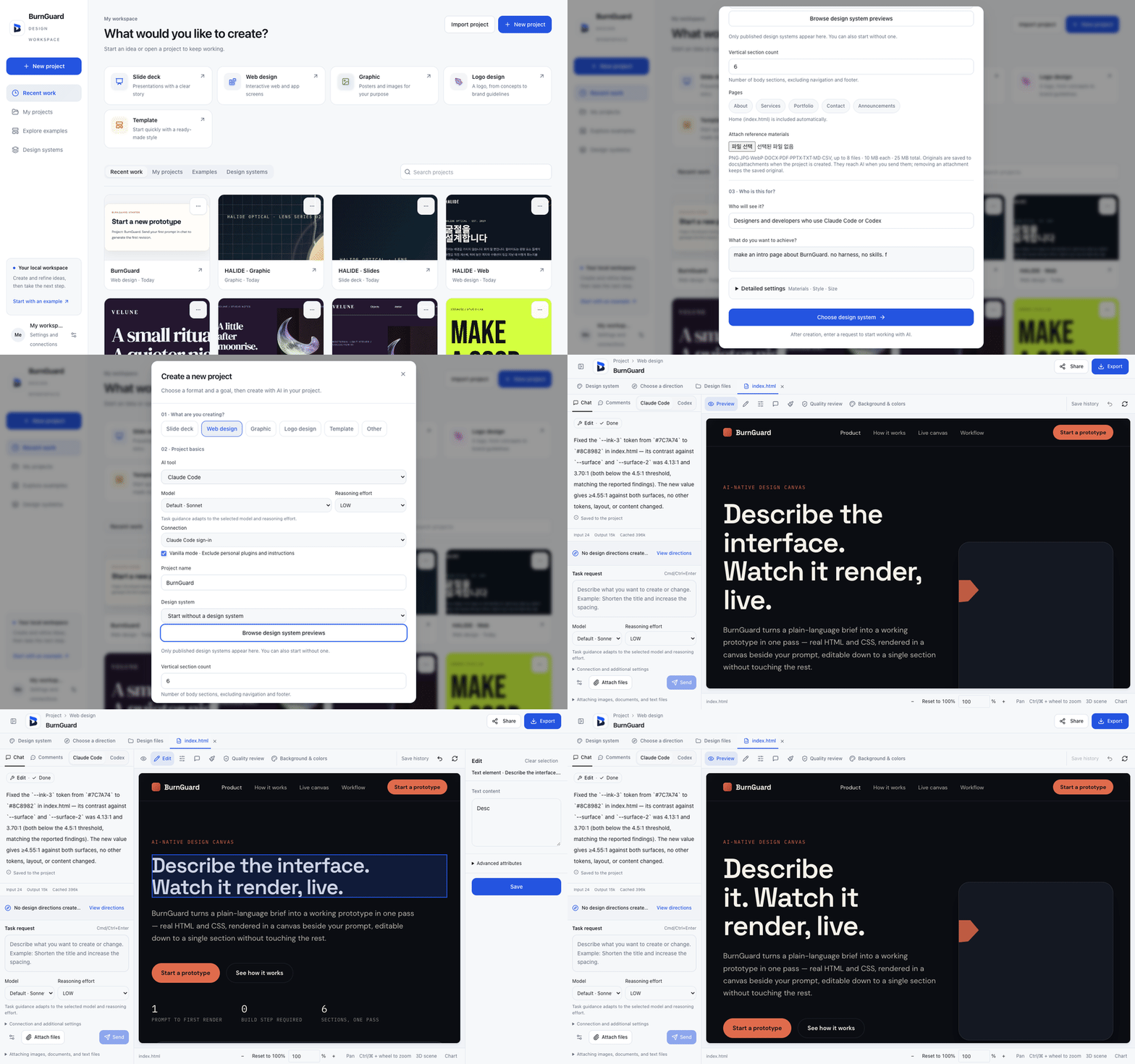
Workspace home preview in HTML · sample prompt
Demo
Describe what you want to make, optionally choose one of 43 built-in themes or your own design system, and select Create and generate to build the first version in one action.
What you make
Each project type sets up the canvas, preview controls, and export checks for that format. You can also view the brief behind any of the 12 bundled sample projects and start from it in one click.
Multi-slide presentations with speaker notes, presentation mode, and HTML, PDF, or PPTX export.
Multi-page websites with shared styles, 1440, 768, and 390 px viewport width presets, HTML ZIP export, and one-click Vercel publishing.
Linked phone or desktop screens on a board, grouped in sections, with a play mode to tap through them and HTML ZIP export.
Posters, social images, and long product detail pages exported as PNG, PNG bundles, image slices, or PDF.
Multi-round concept exploration that produces a master SVG and a brand guidelines PDF or HTML archive.
New projects initialized from a published design system or any of the 43 built-in reference themes.
How it works
Enter your idea, optionally pick a design system, and select Create and generate. On a fresh install, a first-run card checks your Claude Code or Codex status first.
Change text, layout, and colors on the canvas, preview desktop, tablet, and phone widths, inspect before and after revision thumbnails, or save any chat correction as a rule.
Run quality and print checks, export standalone files or shop packages, open the project folder in Finder or File Explorer, or read the live project from your coding agent.
What's new in 0.5.35
A new App screens format turns one line into linked phone or desktop screens that you can play through on a board, logo projects add construction sheet SVG, draw-in GIF, and draw-in MP4 exports, and a geometry-first logo method ships switched off for testing. Read the v0.5.35 release notes.
Enter your idea with a suggested project name and optional audience, or use the first-run guide and the 12 localized example briefs to begin.
Save any follow-up correction in chat as a design-system Do or Don't rule (up to 60 rules per system) or add it to Project instructions (up to 4,000 characters sent with every request).
Download any design system or built-in theme as one DESIGN.md file with tokens, layout notes, and rules, or upload a .md file to create a draft system.
Check websites at Fit, Desktop 1440, Tablet 768, and Phone 390 widths, and compare before and after thumbnails for every saved revision in History.
Open a project's local folder in Finder or File Explorer, inspect live projects read-only with burnguard-read.ts, check CSS background image resolution at rendered tile size, and stop any leftover AI tool process on restart before restoring files.
Installers download directly from the latest GitHub release. Packages are unsigned: on first launch, open System Settings > Privacy & Security > Open Anyway on macOS, or select More info and then Run anyway on Windows.